






Craft AI Assistant
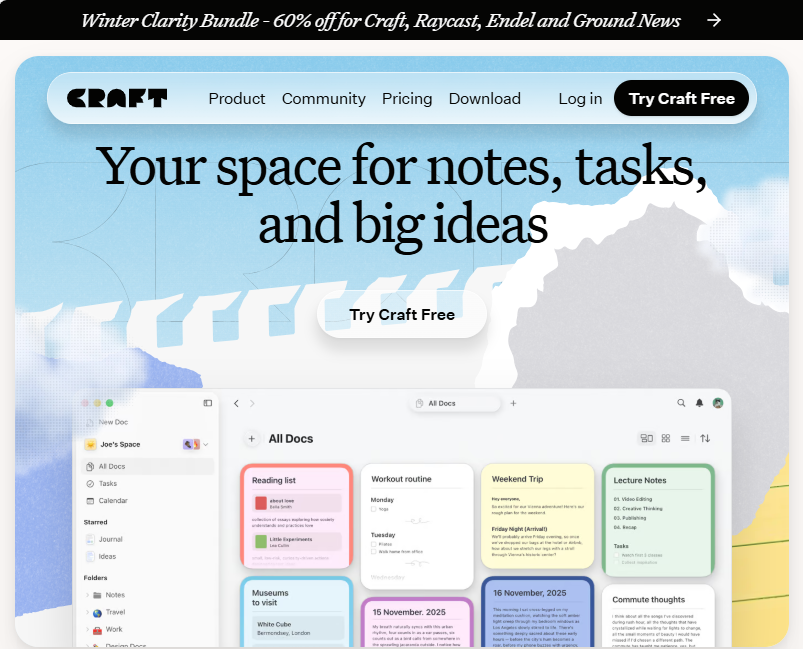
Craft.app (also known as Craft.do) is a powerful AI-enhanced note-taking, document creation, and productivity workspace that combines structured writing, task management, collaboration, and publishing features across multiple devices. Designed for both individual creators and teams, Craft helps users turn ideas into polished documents, organized workflows, and shared content with ease.
What Is Craft.app?
Craft.app is a modern digital workspace that blends note-taking, documentation, task and calendar planning into one visually appealing platform. It uses blocks and nested pages so you can build everything from quick notes to rich documents, project outlines, and personal wikis. With seamless syncing across iPhone, iPad, Mac, Windows, and web, Craft lets you capture ideas anywhere and refine them everywhere.
Users appreciate Craft’s intuitive interface, where every paragraph or element is a block that can be reorganized or converted into sub-pages, making documents both flexible and deeply structured.
Core Features & Capabilities
Rich Document & Note Creation
Craft transforms your thoughts into beautifully formatted documents with drag-and-drop, block layouts, embedded media, and templates optimized for clarity and visual appeal.
AI-Assisted Writing & Editing
Integrated AI features help users with summarization, rewriting, research, and content refinement, making it easier to generate polished text quickly and stay in a productive writing flow.
Built-In Tasks & Planning
Tasks are embedded directly inside your documents — no app switching needed. You can capture, track, schedule, and view your tasks alongside your ideas or daily notes, linking them directly to context.
Calendar & Daily Notes
Daily notes and the calendar view help you organize your day, reflect on progress, and plan future tasks with reminders and deadlines integrated into your document system.
Custom Organization
Craft supports Spaces, Folders, Tags, and Collections that adapt to your workflow, letting you structure personal or professional content hierarchically or as interconnected networks.
Publish & Share
Craft lets you publish pages publicly or privately, with support for custom domains on higher plans — ideal for portfolios, documentation hubs, or branded resources.
Collaboration in Real Time
Real-time editing enables teams to work together on documents, with changes synced instantly across devices and shared spaces for feedback and collective creativity.
Typical Use Cases
- Note-Taking & Writing — Capture thoughts, lecture notes, book drafts, and essays with a focus on readability and structure.
- Project Documentation & Team Collaboration — Create shared docs, project plans, and reference materials with live updates.
- Task & Workflow Planning — Organize personal and professional tasks directly within writing contexts.
- Daily Journals & Calendars — Manage daily logs and integrate your schedule through smart daily notes.
- Publishing & Sharing — Share structured content with audiences, link to live pages, or embed documents on the web.
Why Choose Craft.app?
Craft stands out with its clean, design-first interface, making document creation feel natural and enjoyable even for complex projects. It balances intuitive note-taking with deeper organizational tools like nested pages and collections, while AI enhancement boosts writing productivity. Cross-device sync, offline support, and rich media integration further strengthen its appeal for creators, professionals, and teams alike.
Limitations & Considerations
Despite its strengths, Craft currently lacks:
- A public API, which limits deep automation and third-party integration.
- A native Android app (currently web access only).
- Advanced built-in Kanban boards and mind-mapping features.
These are areas frequently requested by users and may impact certain workflow preferences.
Related AI Tools




0 Comment